
Envelomat 2 – envelope and address label printing software
Envelomat 2 prints addresses on envelopes, label sheets and mail-merge letters straight from your address book. The envelope comes out right the first time, and a bulk print for a whole group takes minutes instead of an hour in Word.
For Windows 10 and Windows 11 (64-bit). 30-day free trial, no registration.
At a glance
| Program | Envelomat 2 – envelope, address label and mail-merge letter printing with an address book |
|---|---|
| Developer | UtilStudio, s.r.o., Slovakia |
| Current version | 2.0.3 (12 November 2026) – replaces Envelomat 1.x |
| Price | Basic €39, Enterprise for 3 PCs €99 excl. VAT – one-time payment, perpetual licence. Prices and editions |
| Free trial | 30 days, all features, no registration |
| Operating system | Windows 10 and Windows 11, 64-bit; .NET Framework 4.8 (installed by the setup if missing) |
| Languages | English, Slovak, Czech |
| Envelope sizes | 56 ready-made templates: DL, C4–C8, B4–B6, US sizes (A2–A10, #9, #10…), custom size |
| Address import | Excel (.xlsx), LibreOffice (.ods), CSV, vCard, clipboard (also addresses as plain text from an e-mail – optionally with AI on your computer), Envelomat 1.x |
| Letters by e-mail through your own e-mail account (SMTP – the wizard recognises Gmail, Outlook.com and your company server), encrypted connection, sending limits, SPF / DKIM / DMARC check | |
| Data and privacy | The address book is stored on your computer or on your own office server (Firebird database) with an automatic daily backup. Addresses are never uploaded; e-mails are sent only through your own e-mail account. |
Envelomat 2 replaces Envelomat 1.x
The new version was rewritten from scratch: a modern, fast interface, a 64-bit program, an exact preview in millimetres, direct Excel import, address groups, mail-merge letters and QR codes. Your Envelomat 1.x data – addresses, senders, groups, custom templates and labels – is transferred with one click, and the old program stays untouched.
Owners of an Envelomat 1.x licence get the new version at a discounted price (Basic €25, Enterprise €59 excl. VAT). How to upgrade to Envelomat 2 →
What Envelomat 2 does
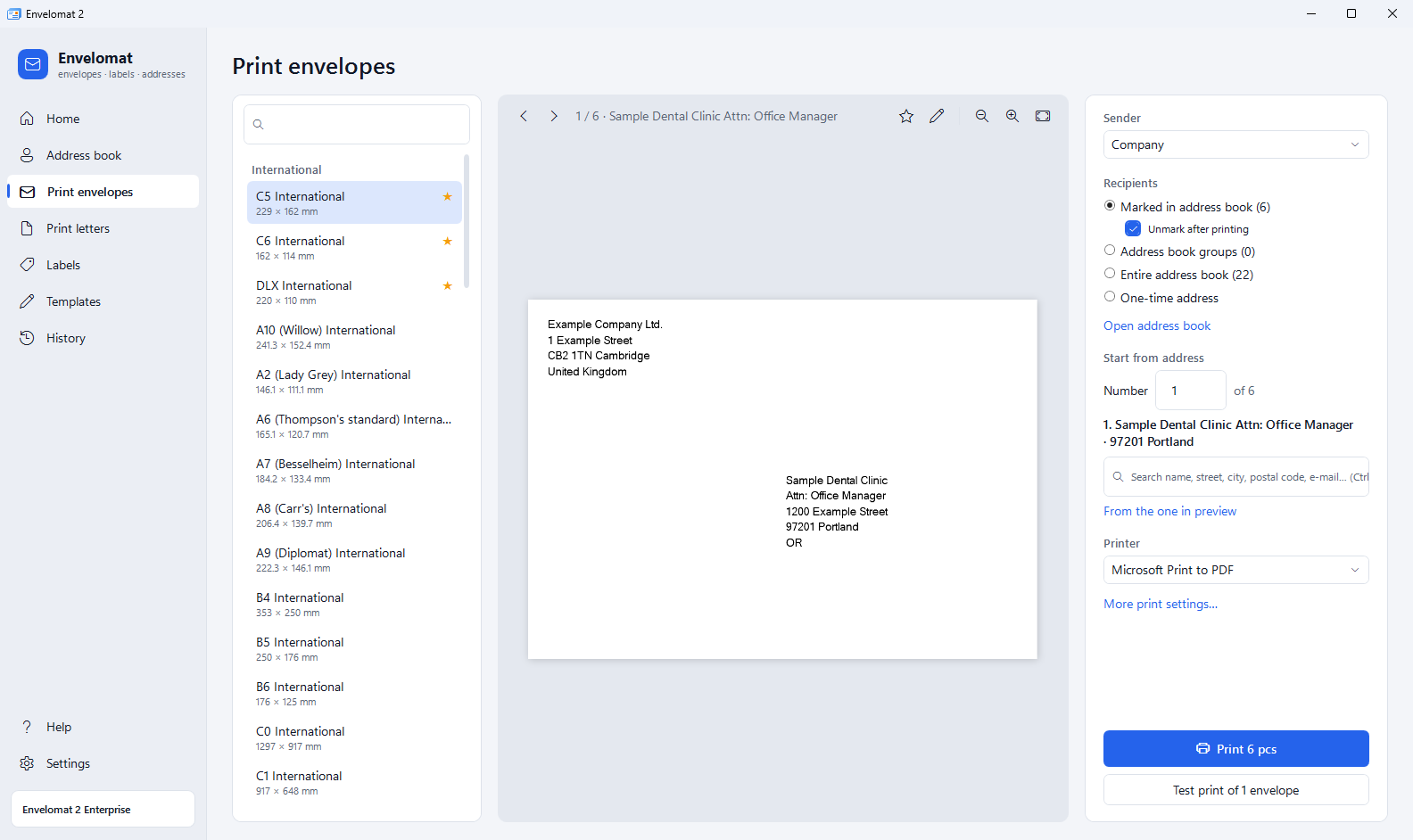
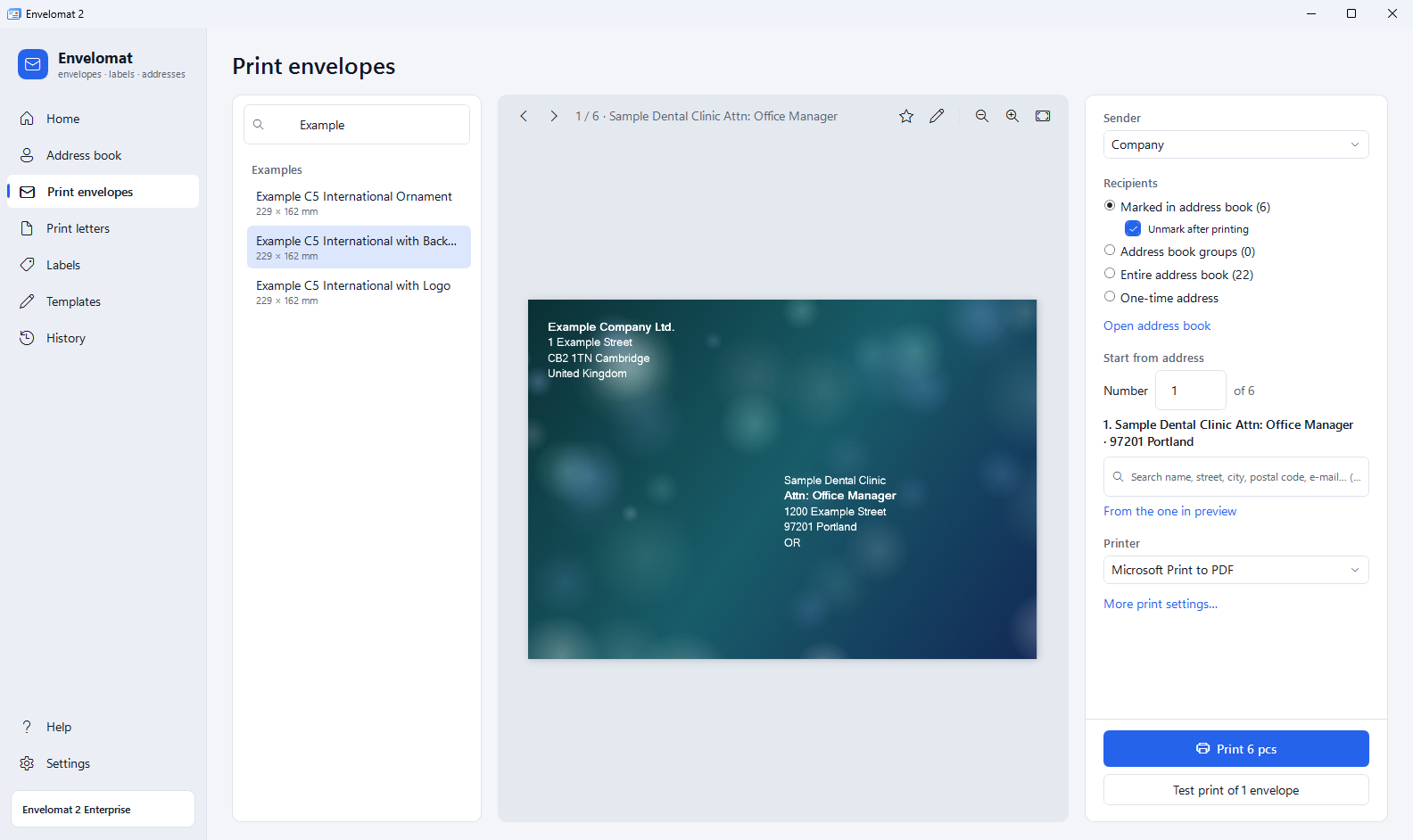
- Envelopes right the first time – live preview exact to the millimetre, browse recipients, skip empty lines, print offset calibration per printer and a single test envelope.
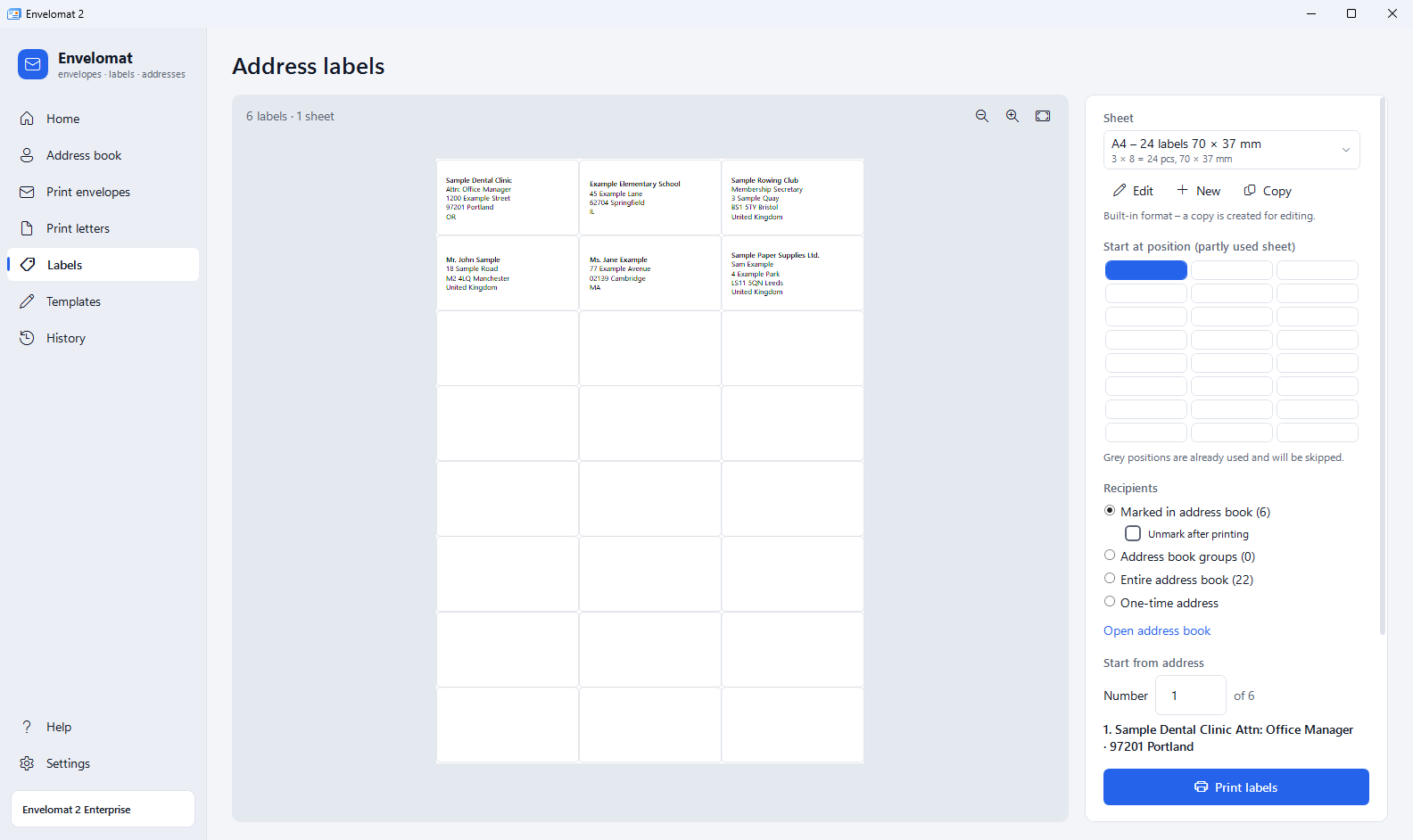
- Address labels – 11 common A4 sheets (e.g. 3 × 8, 70 × 37 mm), 17 formats from Envelomat 1.x and your own formats. Printing can start at any position of a partly used sheet.
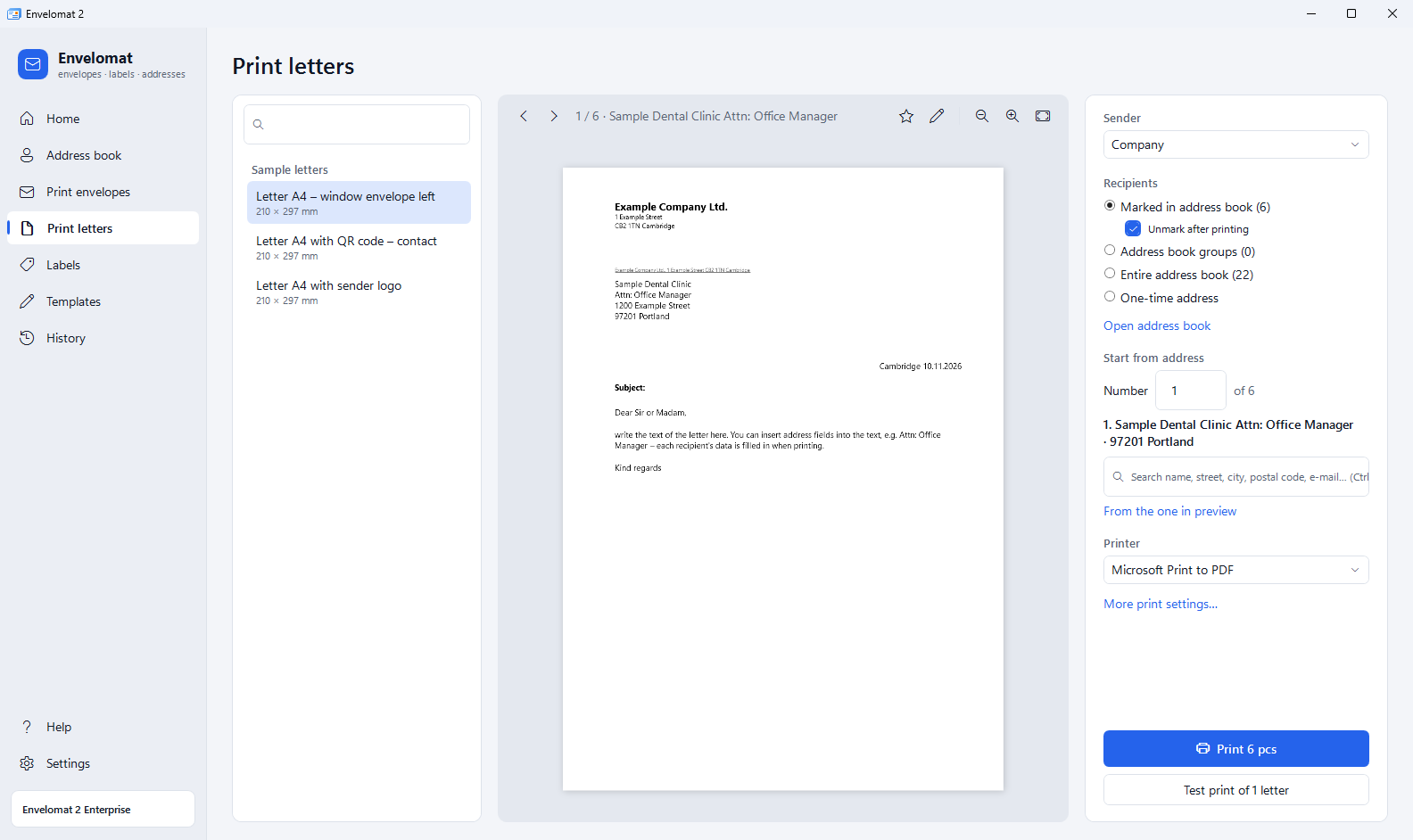
- Mail-merge letters – A4 letter with the recipient address placed exactly for a window envelope (DIN 5008), text with address fields and a QR code. One letter per recipient.
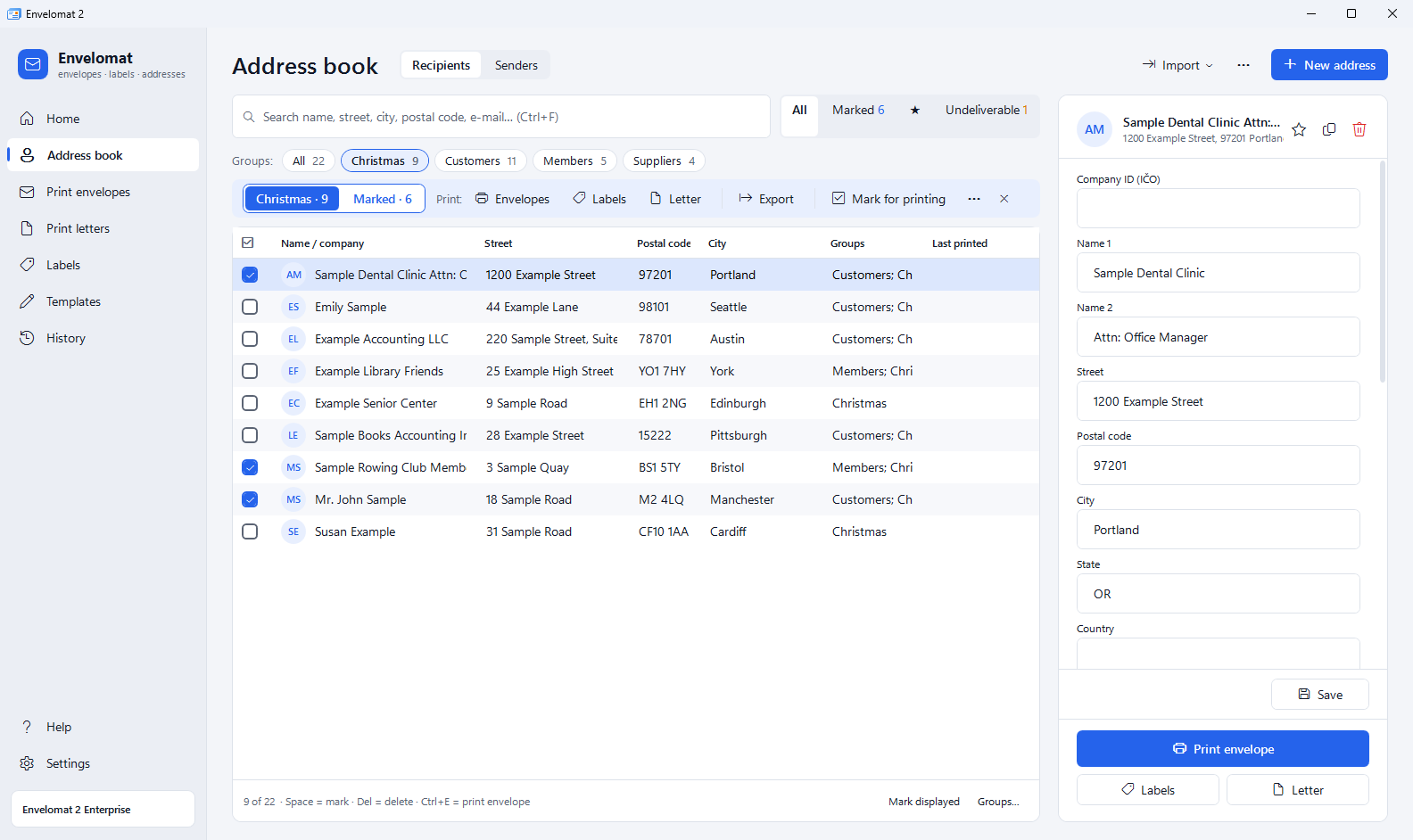
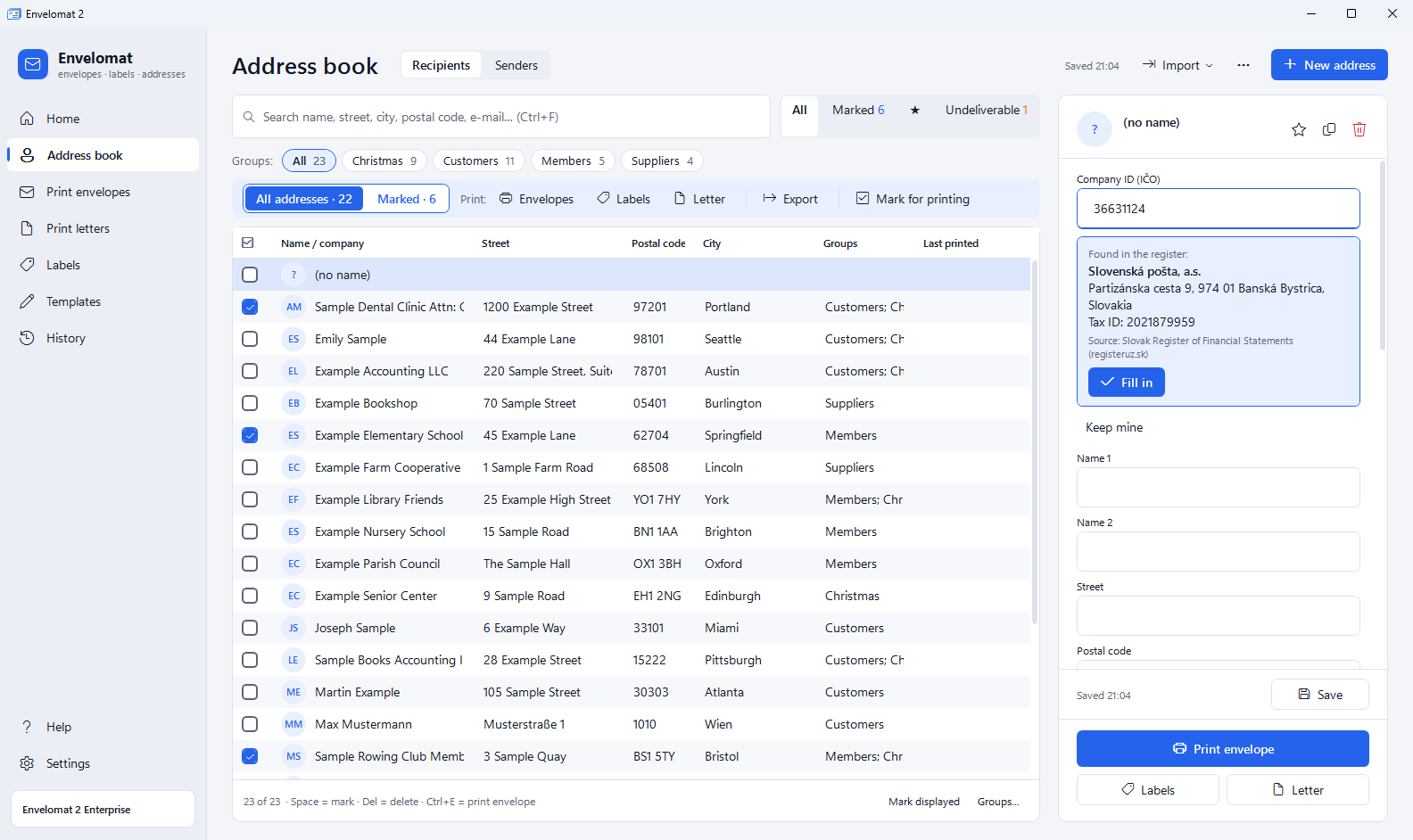
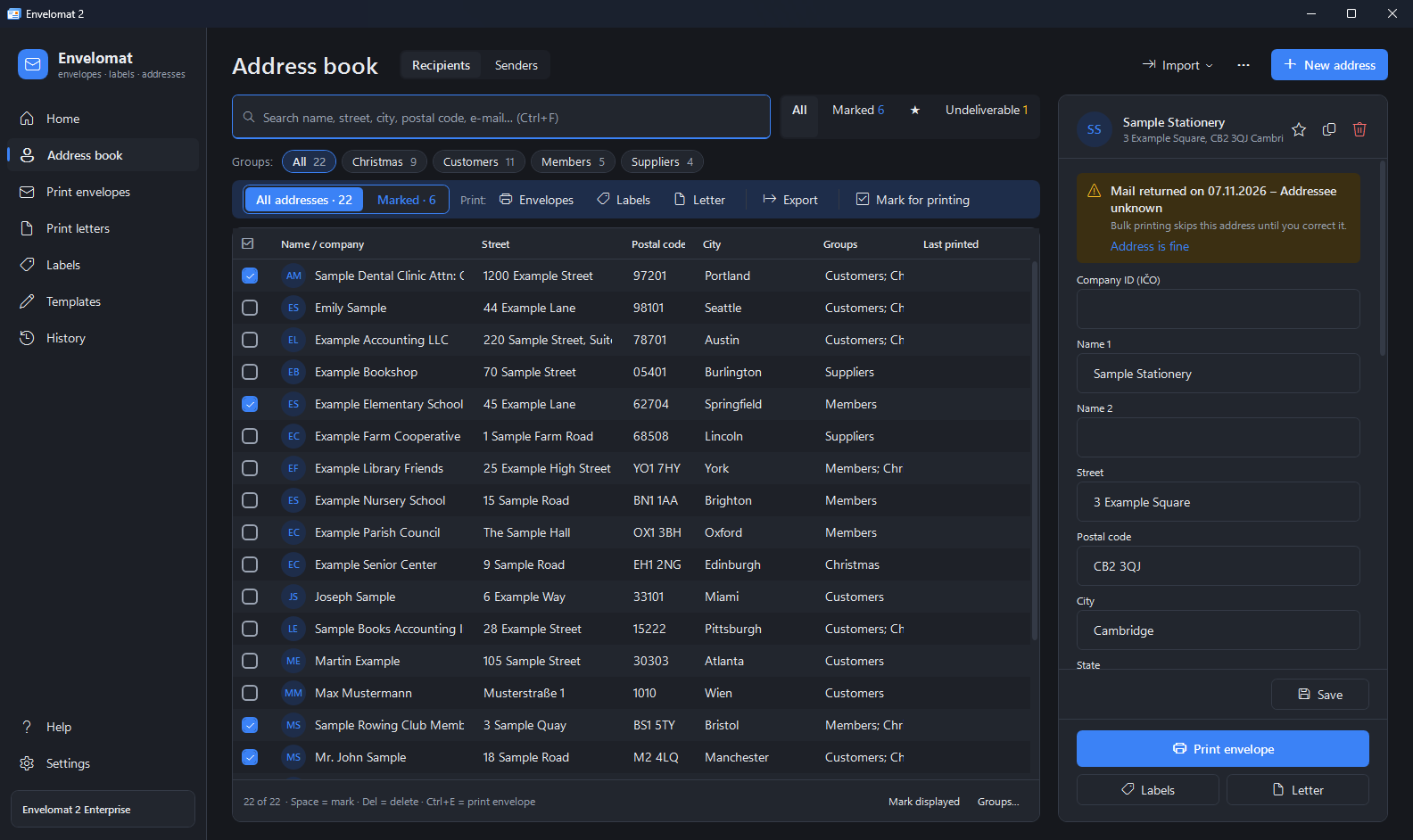
- Address book with groups – instant search, an address in several groups, favourites, marking with the space bar, automatic saving and delete with Undo.
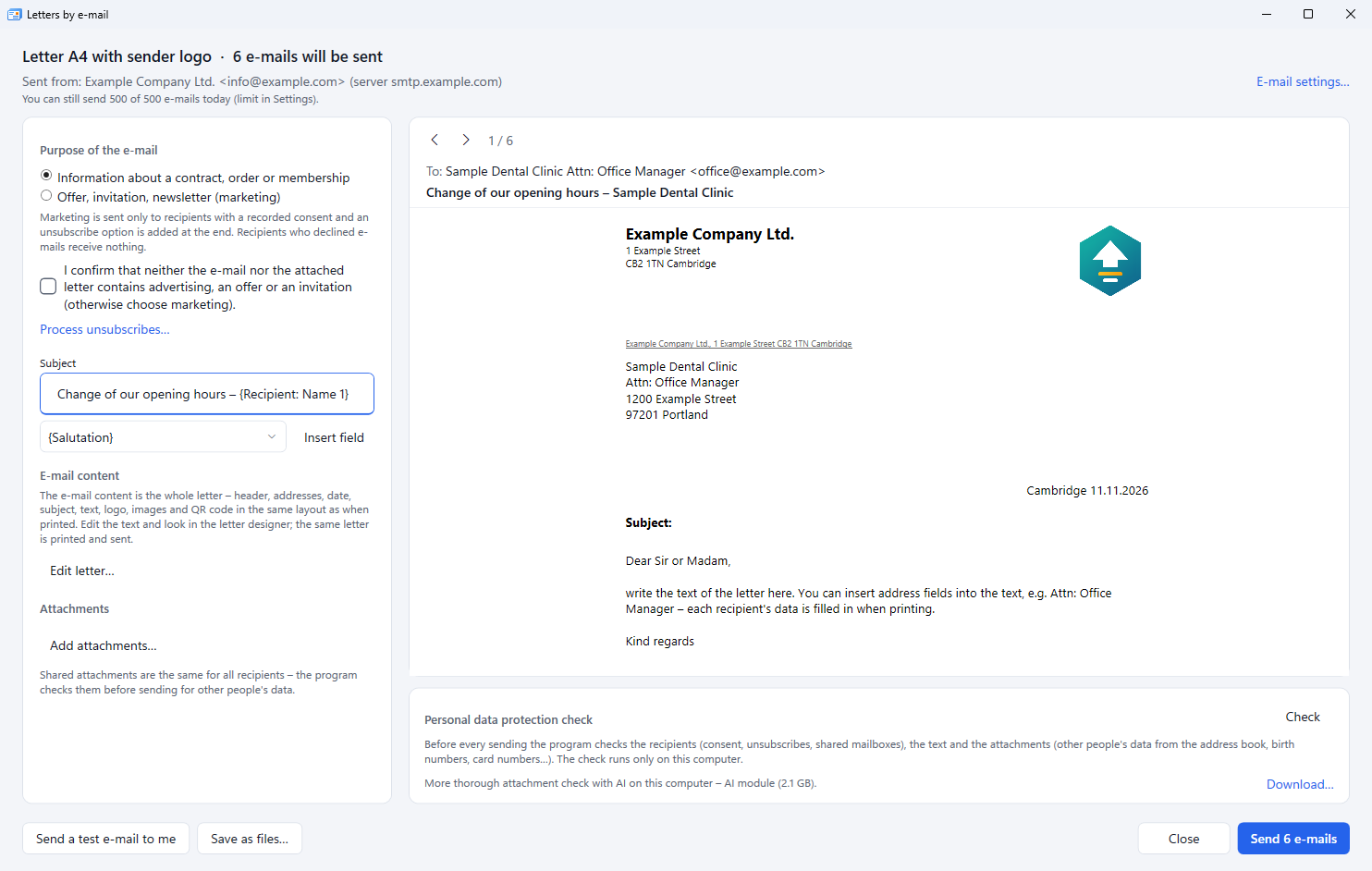
- Letters by e-mail too – send the same mail-merge letter by e-mail instead of printing it: each recipient gets a separate message with your logo, address and QR code. Before sending the program checks GDPR – marketing e-mails only to recipients with consent, an unsubscribe option, and it blocks an address list or ID numbers attached by mistake.
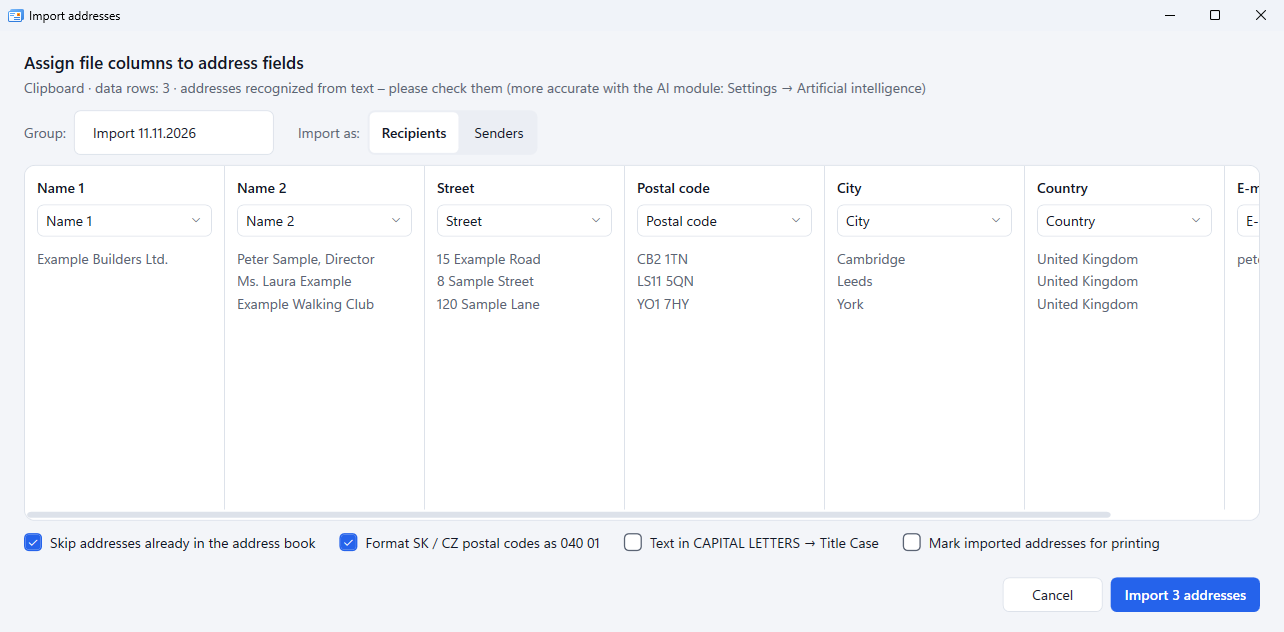
- Excel import in one go – .xlsx, .ods, CSV, vCard or addresses copied from an e-mail. Columns are mapped automatically (also with AI help), duplicates are skipped.
- Addresses from an e-mail with Paste from clipboard – copy text with addresses (several at once, even with a signature) and Envelomat splits it into company, name, street, postal code, city, country and e-mail. The optional AI module is more accurate and runs only on your computer – addresses never go to the internet.
- Address check before printing – missing postal code, city or street, a malformed postal code or a missing country are reported while you type, with a one-click fix.
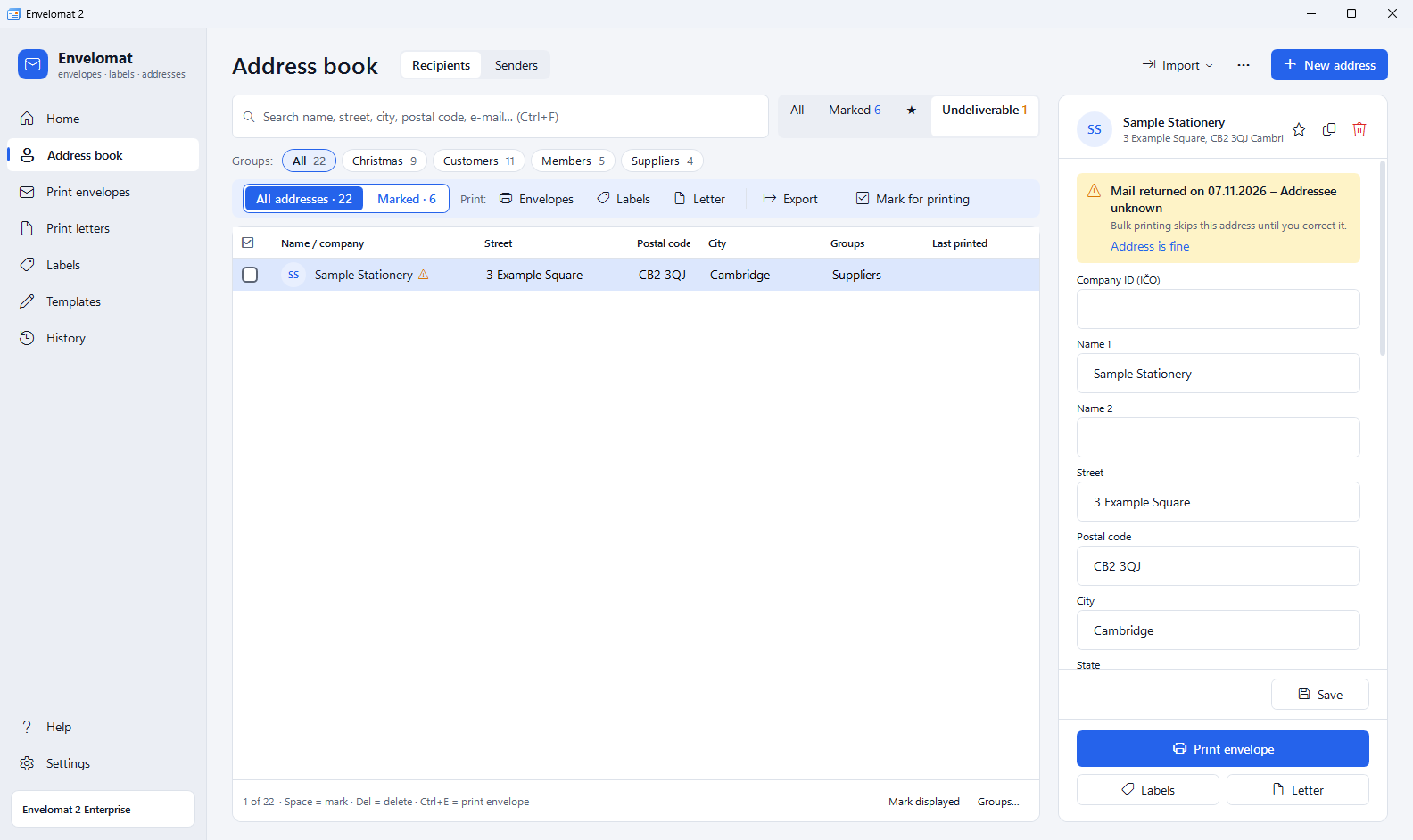
- Salutation and returned mail – letters get an automatic salutation such as “Dear Mr Novak,”. Mark a returned letter and bulk printing skips that address until you correct it.
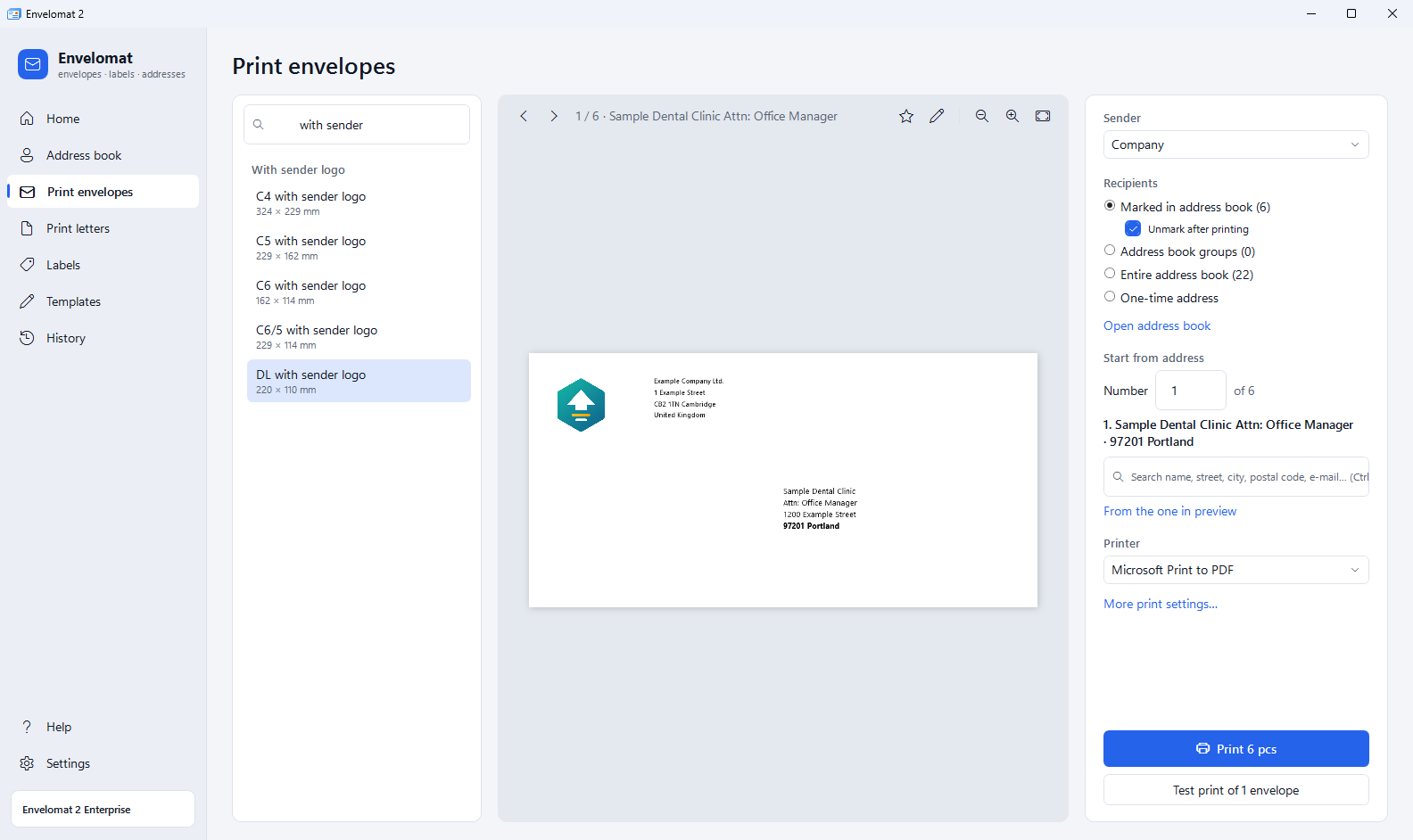
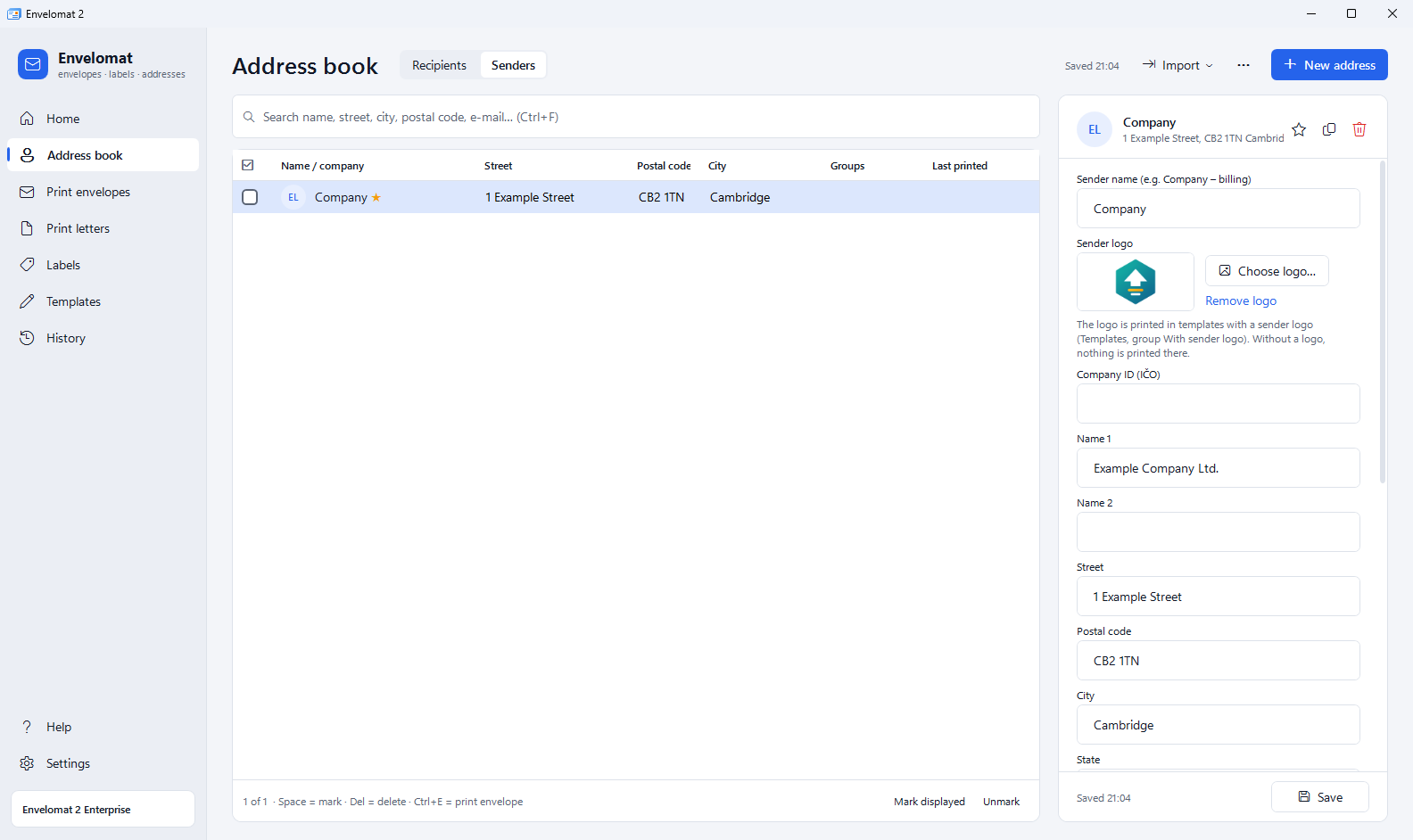
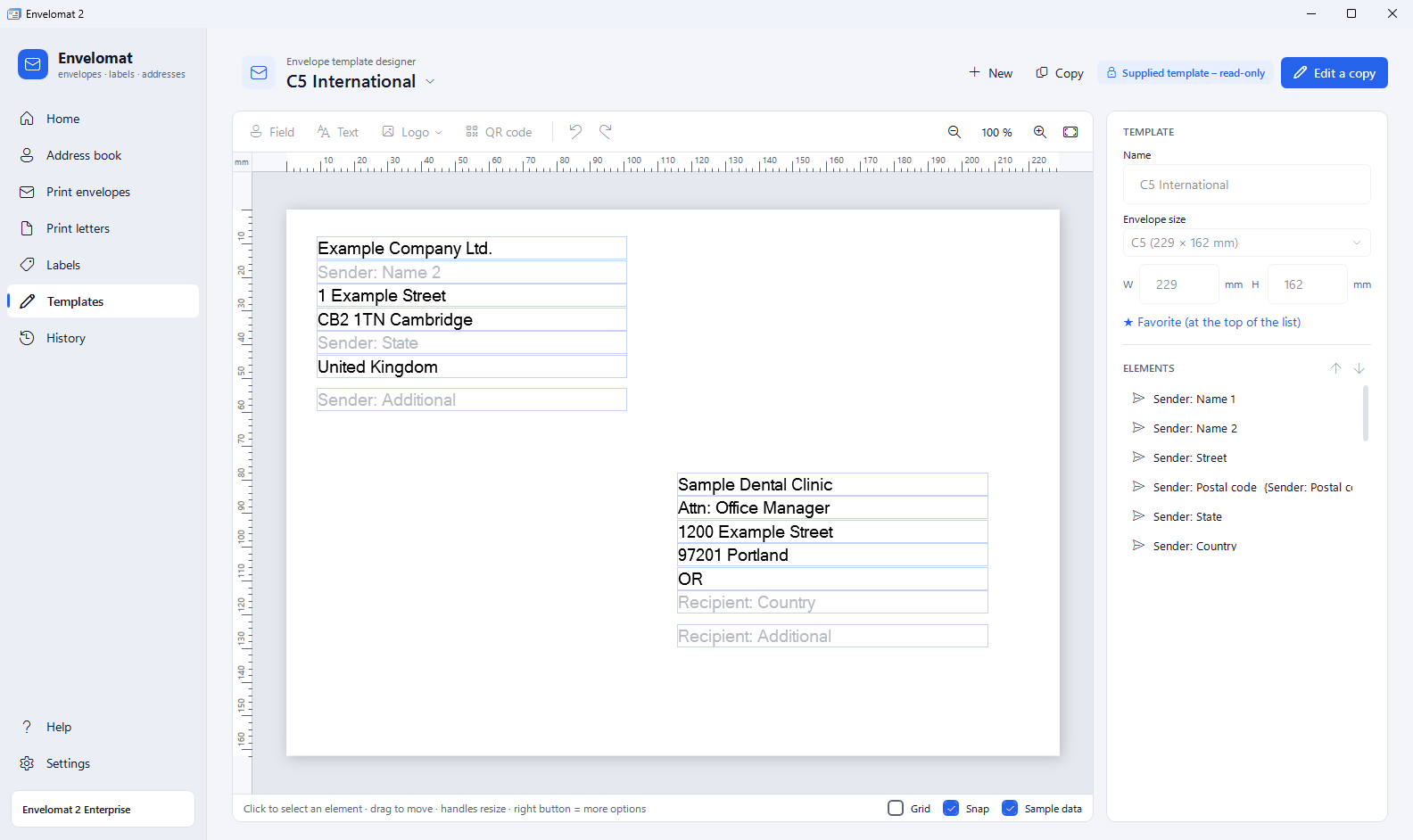
- Envelopes with your company logo – add the logo to the sender in the address book and the ready-made templates With sender logo (DL, C4, C5, C6, C6/5 and an A4 letter) print it. Two companies in one office print from one template, each with its own logo.
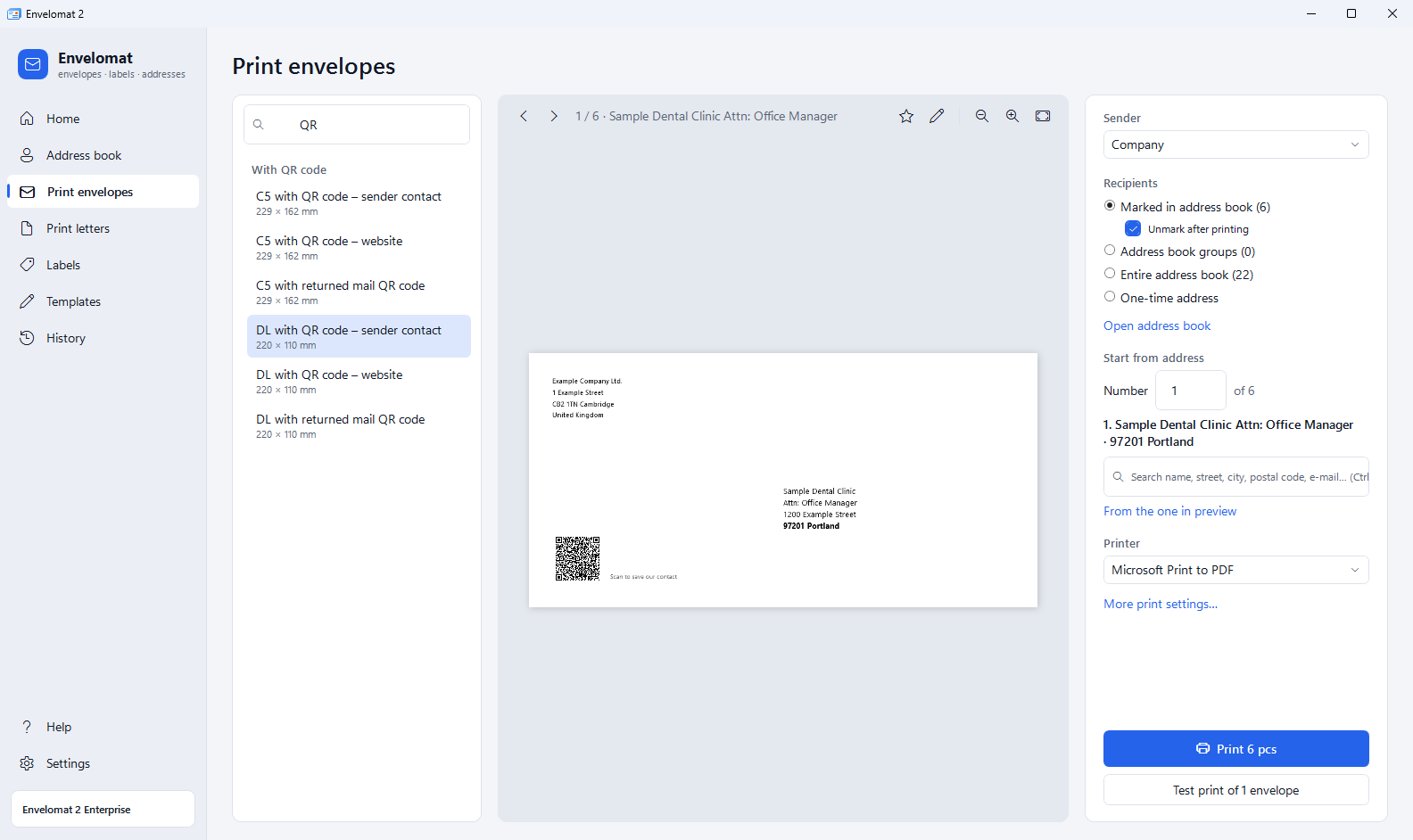
- QR codes without designing – ready-made DL and C5 envelopes with a QR code of your website, the sender contact card (phones offer to save the contact) or a mail code for quick marking of returned envelopes. Also an A4 letter and two label formats with a QR code (Enterprise).
- Template designer – 56 envelope sizes, logo, fixed text, background image, QR code (Enterprise), rulers in mm, drag & drop, Undo / Redo. Templates and label formats move to another computer as a file – templates and labels from Envelomat 1.x can be imported too.
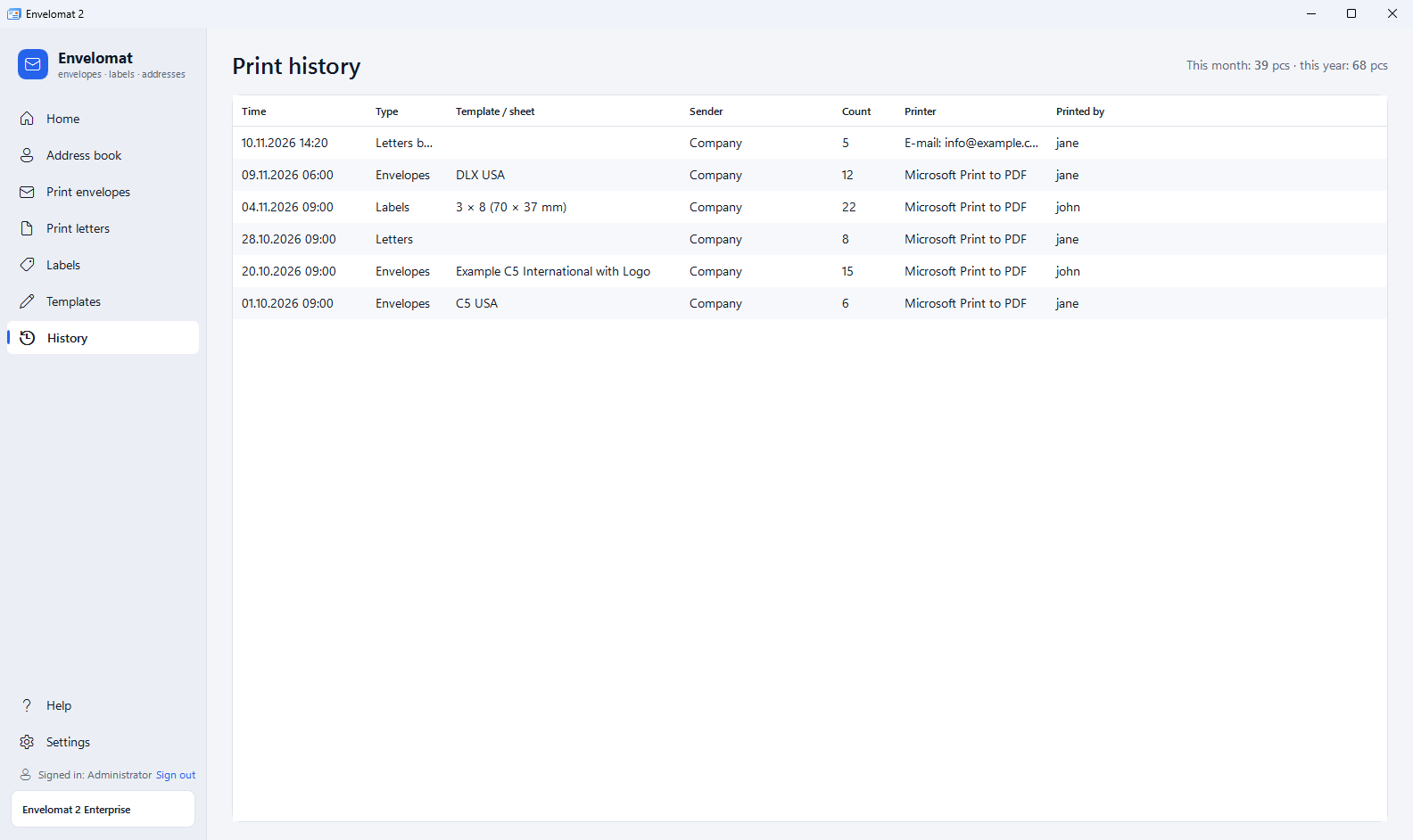
- Bulk printing for a group – envelopes, labels, a letter or a CSV export for a whole group or the marked addresses with one click. Finish an interrupted print with Continue from… in the history.
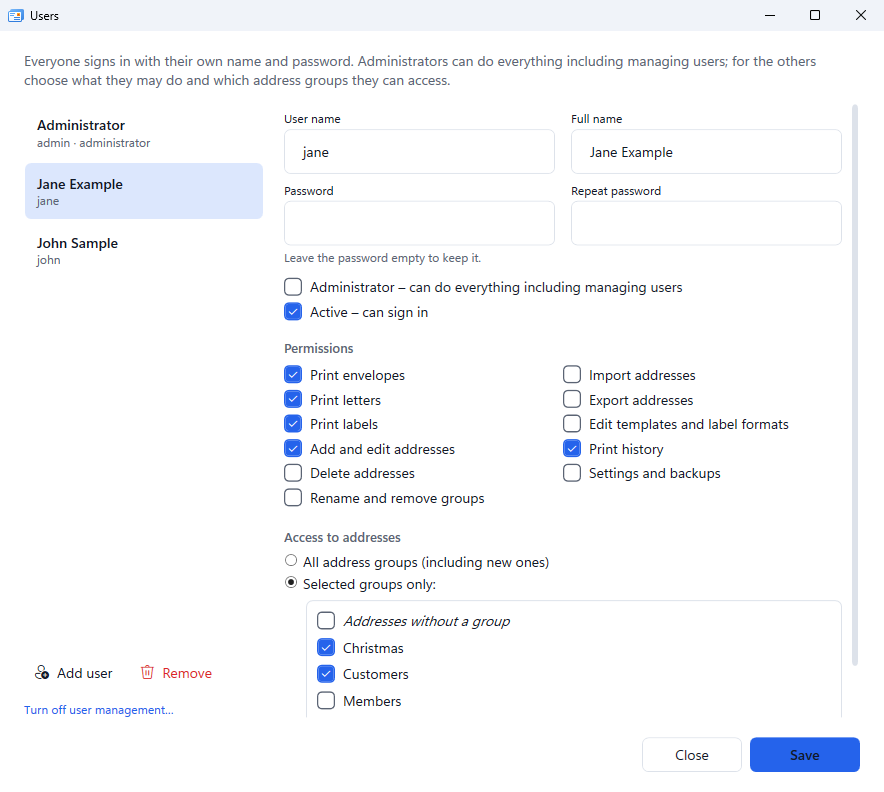
- An office on several computers – the Enterprise edition shares one database on a Firebird server and adds users with passwords: everybody may do only what you allow, optionally only with selected address groups.
How to print envelopes – 3 steps
- Addresses – type them, import them from Excel or transfer them from Envelomat 1.x. Mark the recipients or choose a group.
- Template – choose the envelope (DL, C5, #10…) or a template with the sender logo, and the sender. The preview shows exactly what will be printed.
- Print – first one test envelope, then all of them. After printing the marks are cleared and the job is saved to the history.
Who is Envelomat for
- Municipalities, schools and public offices – notices, invitations and announcements for whole groups of recipients.
- Accounting offices and small businesses – envelopes with a logo for invoices and reminders, client addresses from Excel.
- Associations, clubs and parishes – member letters, invitations and Christmas greetings on labels or envelopes.
- Online shops – address labels for parcels, starting at a partly used sheet so no labels are wasted.
With 20 envelopes a week and 10 minutes saved compared with Word, you save about 8 hours a year – the Basic licence pays for itself in the first month.
Envelomat 2 or a mail merge in Word?
Word can print envelopes and labels too, but every mailing means setting up the document, connecting the Excel table and checking margins again. Envelomat 2 is made only for envelopes, labels and address letters – on paper or by e-mail:
| Mail merge in Word | Envelomat 2 | |
|---|---|---|
| Envelope size | set the envelope size, fields and margins for each mailing | 56 ready-made envelope templates and an exact preview in mm |
| Addresses | an Excel table connected again for every merge | own address book with groups; Excel is imported once |
| Company logo | inserted into every document; another sender means another document | stored with the sender; one template prints the logo of whichever sender you choose |
| Labels on a partly used sheet | used labels have to be skipped by hand with empty rows | click the first free label |
| Printer offset | change the document margins | correction in mm remembered for each printer, test print of 1 envelope |
| Address check | none | missing or wrong postal code, missing country, returned mail skipped |
| Printing again | merge again, interrupted printing has to be sorted out by hand | print history, Print again and Continue from… in the original order |
| Sending by e-mail | merge to e-mail through Outlook; consent, unsubscribes and attachments are checked by hand | the same letter by e-mail, one recipient per message, marketing only with recorded consent, check of text and attachments for other people's data |
Other options: LibreOffice and Avery
Envelomat 2 side by side with a mail merge in Word, LibreOffice Writer and Avery Design & Print Online – price, templates, address book, printer offset, e-mail and GDPR.
Envelomat 2 prices
Trial version
Free
30 days, no registration
- All features of Enterprise
- Occasional watermark on printouts
- Your data stays when you buy
- Then free as Free: 10 prints a month without watermark
Basic
€39 excl. VAT
1 PC · one-time payment, perpetual licence
- Clean printing without watermark
- Unlimited address book and import
- Company details by company ID, postal code check
- Envelopes, labels, letters, designer
- Letters by e-mail with a GDPR check
- Free updates 2.0.x
Enterprise
€99 excl. VAT
3 PC · one-time payment, perpetual licence
- Everything in Basic
- Shared database – one address book for the whole office
- Users with passwords and permissions
- QR codes on envelopes, labels and letters
- Priority support
More computers and subscription
| Enterprise Business 10 computers | €249 | Buy |
| Enterprise Network 20 computers | €349 | Buy |
| Enterprise with updates (subscription) 3 computers · always the newest version (also 2.1, 3.0…) for 1 year | €49 / year | Buy |
All prices are excl. VAT. Price per computer: €33 (3 PC), €25 (10 PC), €17 (20 PC). Need more computers? Contact us. Contact →
Envelomat 2 screenshots
Frequently asked questions
How much does Envelomat 2 cost?
The trial is free for 30 days; after that the program keeps working free of charge as Free (10 prints a month without watermark, 30 addresses). A Basic licence for 1 computer costs €39, Enterprise for 3 computers with a shared database, users and QR codes €99 excl. VAT. It is a one-time payment, the licence is perpetual and includes free updates of version 2.0.x. Prices
Is my Envelomat 1.x licence valid in Envelomat 2?
No, Envelomat 2 is a new product with its own licence. Owners of a paid 1.x licence buy it at a discount (Basic €25, Enterprise €59 excl. VAT) and transfer all their data free of charge. Upgrade from 1.x
Will I lose my addresses and templates from Envelomat 1.x?
No. Envelomat 2 finds the Envelomat 1.x database itself and offers Import data on the home page. It transfers addresses, senders, groups, custom envelope templates, label formats and field names. The old program and its data are not changed. The transfer works even without a licence and on a new computer without Envelomat 1.x – just copy the file ENVELOMAT.FDB and select it in Settings → Data transfer from Envelomat 1.x. Single templates and labels (.XML, .frx) can also be loaded from files in Templates → ⋯ → Import templates…
Can I print my company logo on envelopes?
Yes. In the address book click Choose logo… at the sender (PNG or JPG) and when printing choose a template from the group With sender logo – DL, C4, C5, C6, C6/5 envelopes or an A4 letter. The logo is printed next to the sender address; if the sender has no logo, the space stays empty. A custom logo position is set in the template designer. The feature is in all editions.
How do I print a QR code on an envelope?
In Print envelopes type “QR” into the search and choose a ready-made template from the group With QR code: a DL or C5 envelope with a QR code of your website, the sender contact (vCard) or a returned mail code. There is also an A4 letter and two label formats with a QR code. QR codes are printed in the Enterprise edition and in the trial; in the Basic edition everything else is printed and the QR code space stays empty.
Why are there addresses in the address book after installation?
They are 4 sample addresses and a sample sender with a made-up logo, so that you see right away how the envelope, label and letter preview looks. They are in the group Sample and you can edit or delete them. When you transfer data from Envelomat 1.x they are removed automatically.
Which envelopes and labels does Envelomat support?
All common envelopes (DL, C4, C5, C6, B4–B6 and US sizes such as #10, A2–A10) and any custom size. Labels on A4 sheets – 11 common formats, 17 formats from Envelomat 1.x and any custom format (size, margins, gaps).
Can I import addresses from Excel?
Yes, directly from an .xlsx file (Excel does not need to be installed), from LibreOffice .ods, CSV and vCard, or from the clipboard. Envelomat maps the columns (Name, Street, Postal code, City…) and skips addresses that are already in the address book.
Can I send mail-merge letters by e-mail?
Yes. In Print letters click Send by e-mail… – each recipient gets a separate e-mail whose content is the same letter as on paper (logo, addresses, text, QR code), and you can add attachments. E-mails go through your own e-mail account; the wizard in Settings → E-mail sets it up from your address (Gmail, Outlook.com, your company server) and keeps to the provider's sending limits. Before sending the program checks personal data protection: marketing e-mails go only to recipients with a recorded consent and with an unsubscribe option, recipients never see each other's addresses, and an attached contact list or ID numbers block the sending. The feature is in the trial and in the Basic and Enterprise editions. Guide
How do I add addresses copied from an e-mail?
Select the text with the addresses in an e-mail, on a website or in a signature, copy it (Ctrl+C) and click Paste from clipboard in the address book (Ctrl+Shift+V). Envelomat splits the text into company, name, street, postal code, city, country and e-mail, leaves out greetings and signatures and shows the result for checking before saving. More accurate recognition is offered by the optional AI module (about 2.1 GB, downloaded only with your consent), which runs only on your computer and works offline.
Are my addresses sent to the internet?
No. The address book is stored on your computer (or on your own office server). During an import the UtilStudio AI service can suggest the column mapping – it only receives the column names and the shape of the values (e.g. 999 99), never names or addresses. Recognising addresses in pasted text (also with the AI module) and the address check run only on your computer. The optional company lookup sends only the typed company ID to the public register, the e-mail setup only the domain of your address. Letters by e-mail are sent only through your own e-mail account. You can switch the internet functions off in the settings.
Can several people in an office use one address book?
Yes, with the Enterprise edition. Install the free Firebird 5.0 database server on one computer or server in the office and all computers use one address book, the same templates and a common print history. User management decides who may print, edit, delete, import or export addresses and which groups they can see. The database on the server is created only by the administrator, once – Envelomat never overwrites an existing database. Enterprise licences cover 3, 10 or 20 computers.
Does Envelomat work for several Windows users on one computer?
Yes. Each Windows user (also on a terminal server) has their own address book and settings in their profile. To work with one common address book, use the shared database on a Firebird server (Enterprise edition).
What if my printer prints the address in the wrong place?
In Print envelopes use Test print of 1 envelope and enter an offset correction in mm in More print settings. Envelomat remembers it for each printer.
Which Windows versions are supported?
Windows 10 and Windows 11, 64-bit. The installer is signed by UtilStudio, s.r.o. and installs .NET Framework 4.8 if it is missing.
Try Envelomat 2 free for 30 days
For Windows 10 and Windows 11 (64-bit). 30-day free trial, no registration.