

New version UtilStudio Photo Resizer 1.4.0 – free to download
The batch photo editor UtilStudio Photo Resizer 1.4.0 for Windows is free to download and use – no watermark, no trial period and no limit on the number of photos. The new version brings a new look, AI background removal right on your computer, HEIC, AVIF, WebP and RAW support, new output targets, a Czech interface and background work.
Free for Windows 10 and Windows 11 (64-bit).

The new version at a glance
| Program | UtilStudio Photo Resizer – batch photo editor |
|---|---|
| Version | 1.4.0 (November 2026) |
| Price | Free – no watermark, no time limit, no photo limit |
| System | Windows 10 and Windows 11, 64-bit; .NET Framework 4.8 (the setup installs it) |
| Language | English, Slovak, Czech |
| Privacy | everything including AI runs offline on your computer |
| Developer | UtilStudio, s.r.o., Slovakia |
What is new in version 1.4.0
- Free – no licence and no limits, all features are available right away.
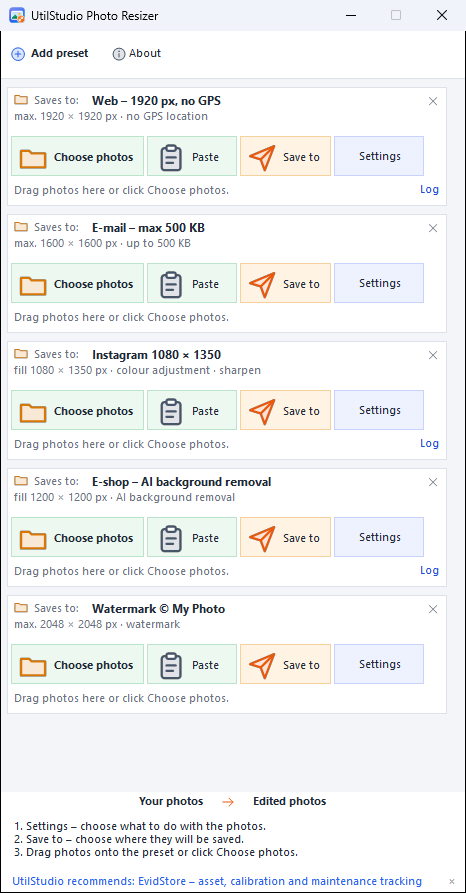
- New look – every preset shows the flow ① Source → ② Edit → ③ Target and a short summary of the edits.
- Offline AI – background removal (white, colour, transparent, blurred) and 4× AI upscaling.
- New formats – opens iPhone HEIC, AVIF, WebP, SVG, JPEG XL and camera RAW; also saves WebP.
- 7 output targets – folder and cloud (OneDrive, Google Drive, Dropbox, iCloud), FTP/FTPS/SFTP, e-mail, clipboard, ZIP, PDF and Windows Share.
- Size in KB – shrink a photo under a chosen limit, e.g. 500 KB for e-mail; remove the GPS location.
- Rename with a live example – date taken, folder name, counter, camera, lens…
- Background mode – start with Windows in the notification area, folder watching, a notification when finished and the Ctrl+Alt+R clipboard shortcut.
- Czech – interface in English, Slovak and Czech.
How to get the new version
- Click Download free and run the setup.
- The setup installs .NET Framework 4.8 if Windows does not have it.
- Start Photo Resizer, pick a preset (e.g. Web or E-mail) and drop photos on it.
Download free All features and screenshots (detail) → 12 practical recipes →
Frequently asked questions
Is the new version of Photo Resizer really free?
Yes. Version 1.4.0 is completely free – it adds no watermark, has no trial period and does not limit the number of photos.
Where can I download the new version?
On this page with the Download free button or on the UtilStudio Photo Resizer product page. The setup comes directly from the developer, UtilStudio.
Which Windows versions does the new version support?
Windows 10 and Windows 11 (64-bit). The setup installs .NET Framework 4.8 if it is missing.
Where can I see all features of the new version?
All features with screenshots are on the page Photo Resizer – features and screenshots.
Download the new Photo Resizer 1.4.0 free
Free for Windows 10 and Windows 11 (64-bit).