


Photo Resizer help · opens with the Help button and F1 in the program

Help: Image adjustments

Auto contrast, sharpen, brightness, contrast, saturation, effects. About UtilStudio Photo Resizer →

UtilStudio Photo Resizer 1.4 for Windows 10 and Windows 11 (64-bit). Free edition with no watermark and no time limit; Pro edition adds AI and automation.

UtilStudio Photo Resizer

Colour and sharpness

Tick Image adjustments to correct all photos of a run in the same way. 0 = no change. Adjustments are applied after resizing and rotation, before the watermark and border.
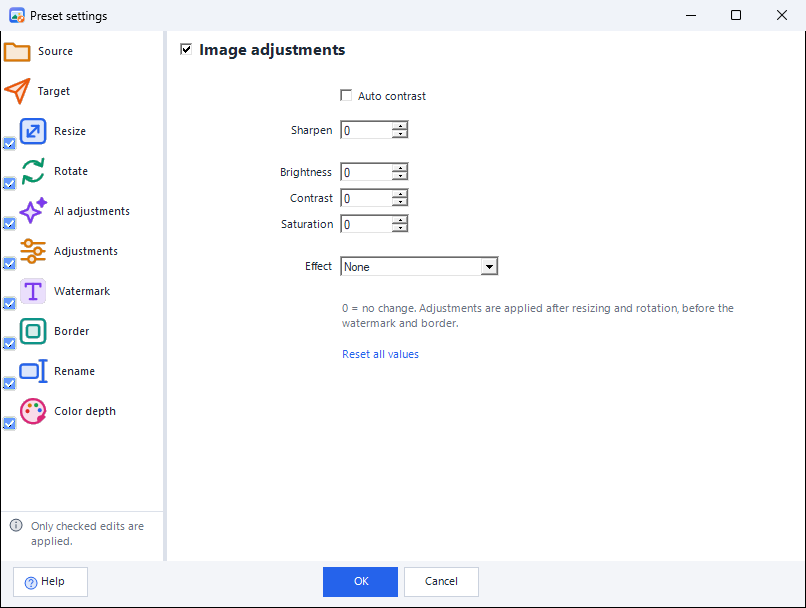
Preset settings – Image adjustments section

Settings

  • Auto contrast – stretches the tones of dull photos.
  • Sharpen (0–100) – useful after strong reduction; 20–40 is usually enough.
  • Brightness, Contrast, Saturation (−100 to +100).
  • Effect – None, Black & white, Sepia.
  • Reset all values – back to zero.

Related topics

In the program, the Help button (main window and preset settings) and the F1 key in any window open the page for exactly the window – and the section of the settings – you are working in. Something missing? Write to us.

Download UtilStudio Photo Resizer free

UtilStudio Photo Resizer 1.4 for Windows 10 and Windows 11 (64-bit). Free edition with no watermark and no time limit; Pro edition adds AI and automation.

Hi! How can I help you?