


New size of the photos
Tick Resize image and choose the Resize mode, the Width and the Height in pixels. Only checked sections of the settings are applied – the tick in the list on the left shows which ones are on.
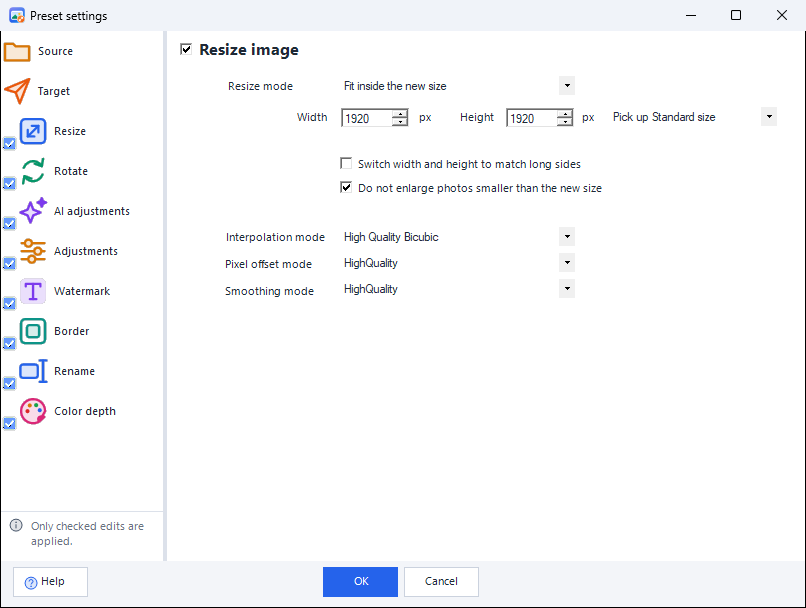
Resize modes
- Fit inside the new size – the photo fits into the box (e.g. 1920 × 1920) and keeps its proportions. The most common choice for web and e-mail.
- Resize to the constant width / Resize to the constant height – one side is fixed, the other follows the proportions.
- Resize to the exact size – exactly the given width and height; the photo may be stretched.
- Fill the size and crop the rest – fills the size exactly and crops what overflows (e.g. 1080 × 1350 for Instagram, 1200 × 1200 for an e-shop).
- Resize in percentage – e.g. 50 % of the original size.
Other options
- Pick up Standard size – ready sizes in the ratios 4:3, 3:4, 3:2, 2:3, 16:9, 9:16 and 1:1, or the size of your screen.
- Switch width and height to match long sides – portrait photos get the same long side as landscape ones.
- Do not resize when original is less than the new one – small photos are not enlarged (turn it off for AI upscaling).
- Interpolation mode, Pixel offset mode and Smoothing mode – the quality of scaling; the defaults (High Quality Bicubic, HighQuality) give the sharpest result.
Target size in KB
A limit in kilobytes is set in the Target section (Max. file size JPG/PNG/WebP). Combine both: e.g. max. 1600 × 1600 px and max. 500 KB.
Related topics
In the program, the Help button (main window and preset settings) and the F1 key in any window open the page for exactly the window – and the section of the settings – you are working in. Something missing? Write to us.