


AI that runs on your computer
AI adjustments Pro remove the background of a photo or enlarge it with sharp detail. Everything runs locally – the photos are never sent anywhere. AI steps are slower than other adjustments.
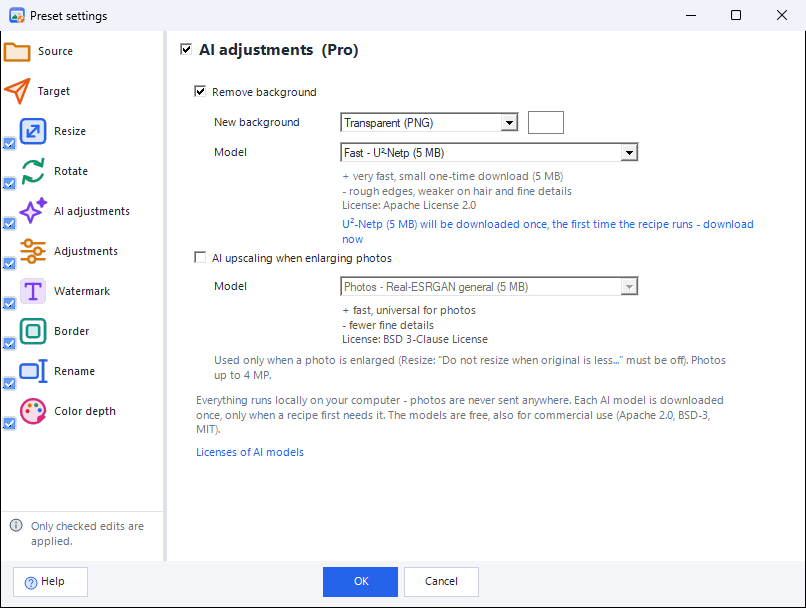
Remove background
- New background – Transparent (PNG), Colour (e.g. white for an e-shop; the button next to it picks the colour) or Blurred (a blurred version of the original).
- Model – Fast – U²-Netp (5 MB, very fast, rougher edges), High quality – IS-Net, Best – BiRefNet lite, People and portraits – MODNet or Drawings and anime – IS-Net anime. The size is shown in the list.
For a transparent background choose PNG or WebP as the target format – JPG has no transparency.
AI upscaling when enlarging photos
Used only when a photo is enlarged – in Resize turn off Do not resize when original is less than the new one. Models: Photos – Real-ESRGAN general, Noisy photos – Real-ESRGAN WDN, Drawings and graphics – Real-ESRGAN anime. Photos up to 4 MP.
When is a model downloaded?
No AI model is part of the installation. Each model is downloaded once, automatically, the first time a recipe that needs it runs – the card shows the progress and the log records it. Only the selected models are downloaded (e.g. 5 MB for the fast model, about 170 MB for IS-Net). In the settings the link … will be downloaded once, the first time the recipe runs – download now downloads them in advance. The models are saved to %LOCALAPPDATA%\UtilStudio\Fire\Models; the checksum of every file is verified. If a model cannot be downloaded (no internet), that AI step is skipped and the log says so.
Licences
The AI models are free, also for commercial use (Apache 2.0, BSD-3, MIT). Licences of AI models lists them.
Related topics
In the program, the Help button (main window and preset settings) and the F1 key in any window open the page for exactly the window – and the section of the settings – you are working in. Something missing? Write to us.