

Where the edited photos go
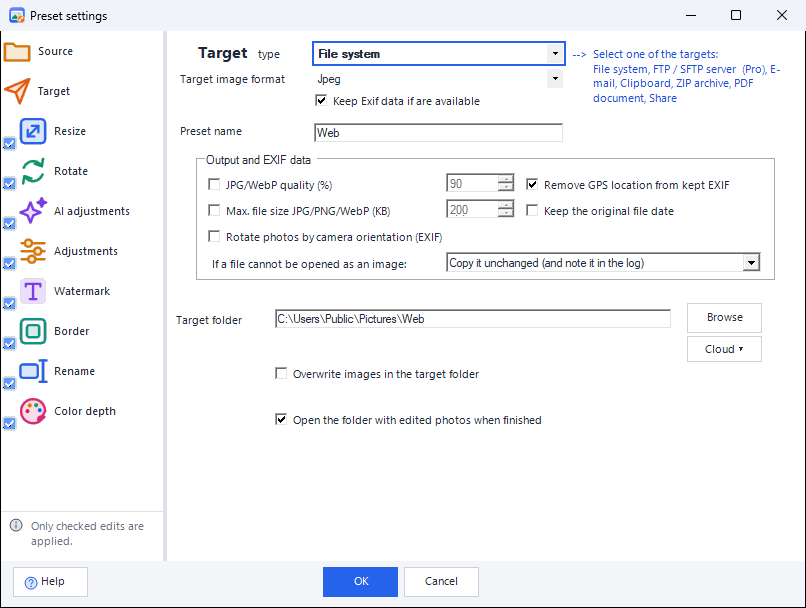
The Target section decides where the edited photos are saved and in which format. Choose the Target type at the top; the lower part of the window changes accordingly.
Target types
- File system – a folder on disk. Cloud picks the OneDrive, Google Drive, Dropbox or iCloud folder – the cloud app then syncs the photos (no sign-in in Photo Resizer). Options: Overwrite images in the target folder, Open the folder with edited photos when finished.
- FTP / SFTP server Pro – upload to ftp://, ftps:// (encrypted) or sftp:// (SSH). On the first SFTP connection the program shows the server key and asks whether to trust it.
- E-mail – sends the photos via SMTP or through your e-mail program (classic Outlook, Thunderbird, eM Client).
- Clipboard – the edited photo goes back to the clipboard, ready to paste into a chat, document or ticket.
- ZIP archive – all photos of one run in one file. The name may contain {date} and {time}.
- PDF document – one photo per page; page size A4 or Letter (portrait or landscape by the photo) or the size of the photo. JPG photos are inserted without loss of quality.
- Share – opens the Windows Share window (WhatsApp, Teams, Outlook, Nearby Share…).
Image format and preset name
Target image format – keep the original or save as JPG, PNG, WebP, GIF, BMP, TIFF or JPEG XR. HEIC, AVIF and RAW photos cannot be written back, so with the original format kept they are saved as JPG. Keep Exif data if are available copies the camera data. Preset name is the title of the card.
Output and EXIF data
- JPG/WebP quality (%) – 90 is a good default; lower means smaller files.
- Max. file size JPG/PNG/WebP (KB) – the program finds the highest quality that fits, e.g. 500 KB for e-mail or 100 KB for a web form.
- Rotate photos by camera orientation (EXIF) – photos taken in portrait are turned upright.
- Remove GPS location from kept EXIF – the camera data stays, the location is removed.
- Keep the original file date.
- If a file cannot be opened as an image – copy it unchanged (and note it in the log), skip it, or report an error.
Related topics
In the program, the Help button (main window and preset settings) and the F1 key in any window open the page for exactly the window – and the section of the settings – you are working in. Something missing? Write to us.