


Where the photos come from
The Source section tells the preset where to take the photos when you click Choose photos and how to treat them. Photos dropped on the card or pasted from the clipboard are always taken as they are.
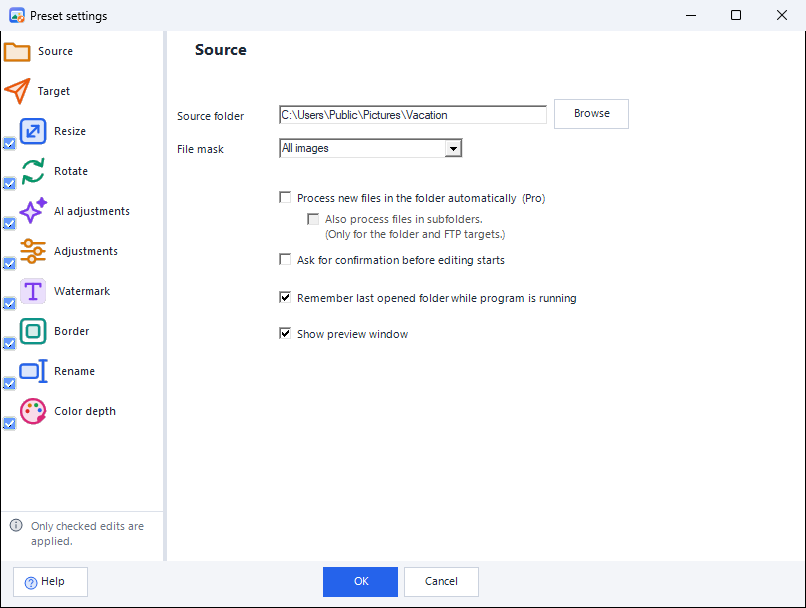
Settings
- Source folder – the folder offered by Choose photos (Browse selects another).
- File mask – which files to take: All images, or only *.jpg, *.png, *.heic… You can also type your own mask, e.g. IMG_*.jpg.
- Process new files in the folder automatically Pro – the preset watches the source folder and edits every new photo that appears there (e.g. from a scanner, a camera upload or a shared folder). Also process files in subfolders includes subfolders (for the folder and FTP targets).
- Ask for confirmation before editing starts – a question before every run.
- Remember last opened folder while program is running.
- Show preview window – thumbnails of the photos before the run, see Preview window.
Folder watch in the background
Watching keeps running when the window is closed to the notification area, and the program can start with Windows. The menu of the icon can pause watching of all folders.
Related topics
In the program, the Help button (main window and preset settings) and the F1 key in any window open the page for exactly the window – and the section of the settings – you are working in. Something missing? Write to us.